How to Sign Up for USPS Informed Delivery
Updated April 2026 · 5 minute read
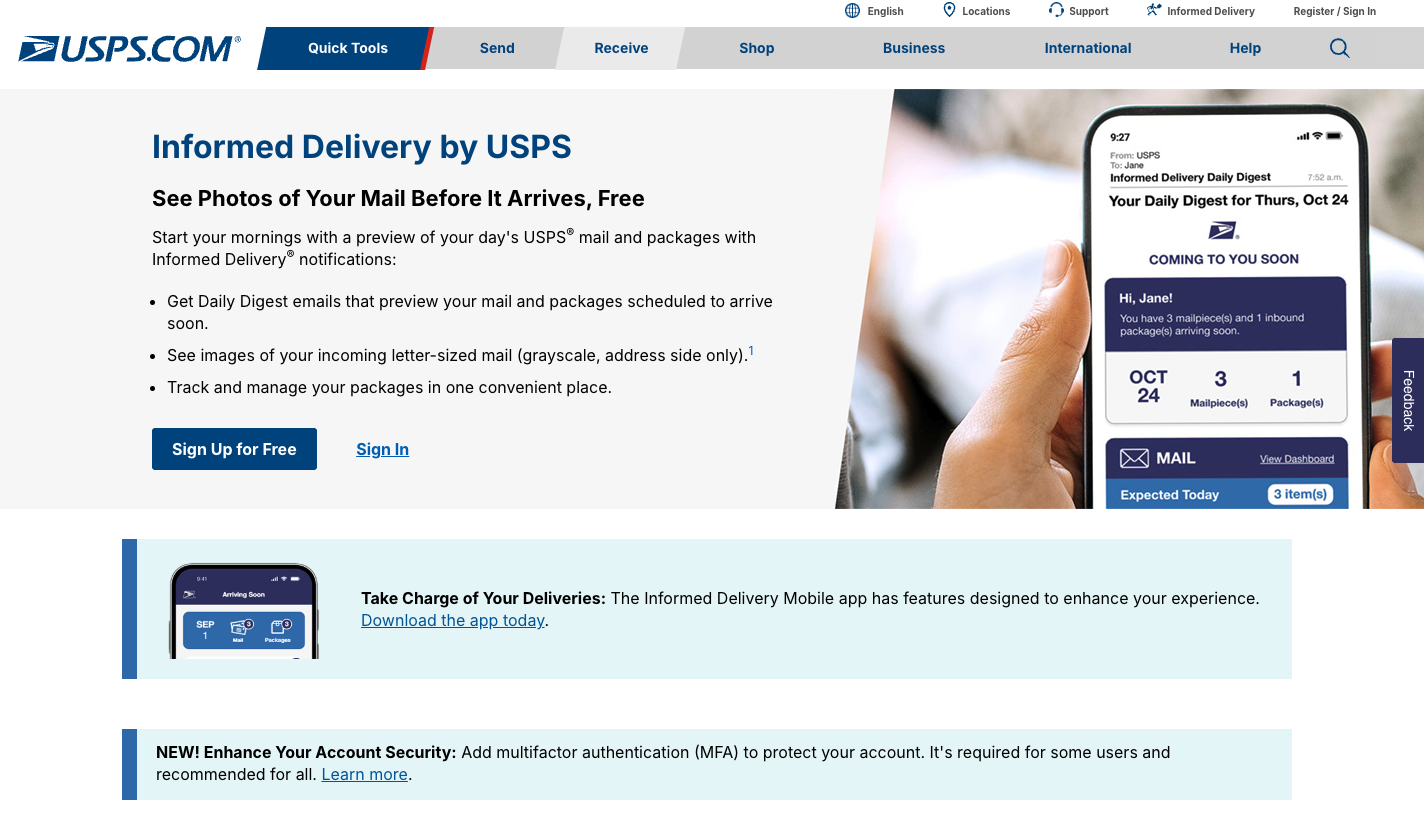
Here's something most people don't know: USPS will email you a photo of every piece of mail headed to your mailbox. Every morning. Before it even arrives. It's a free service called Informed Delivery, and about 60 million households already use it.
This guide walks you through the signup step by step, for both home addresses and business / PO Box / virtual mailbox addresses. The home flow takes about 2 minutes. The business flow is longer and has some gotchas we'll call out as we go.
In this guide:
What Informed Delivery actually is
Informed Delivery is a free service from the US Postal Service. Every morning, on the mail days you get delivery, USPS emails you a daily digest. The digest includes grayscale photos of the front of every letter-sized piece of mail heading to your mailbox that day.
It's been around since 2017. USPS built it as a modern perk for the post office — a way to let people see their mail from anywhere. If you've ever wondered "did my check from the IRS arrive yet?" from a hotel room, this is the answer.
The service is completely free. USPS doesn't charge you anything, and there's no catch. You don't need a credit card. You do need to verify your identity, because USPS wants to make sure you actually live at the address you're getting mail for.
Which addresses are eligible
USPS officially supports three kinds of addresses:
- Residential addresses. The most common case. Single-family homes almost always work. Apartments and condos are hit or miss — more on that below.
- Business addresses. If you run a business at a commercial address, you can sign up with a USPS.com business account.
- USPS PO Boxes. Also supported through a USPS.com business account.
One catch that trips people up: your mailbox needs to be "uniquely coded" by USPS. Single-family homes almost always are. Some apartment buildings and condos aren't, which means the carrier scans the whole building as one route and Informed Delivery can't tell which scan belongs to which unit. If yours isn't uniquely coded, the signup will tell you and offer a waiting list.
There's a fourth kind of address USPS doesn't talk about: virtual mailboxes and commercial mail receiving agencies (CMRAs) like EarthClass Mail, iPostal1, Anytime Mailbox, and Alliance Virtual Offices. The online signup usually rejects these. We document exactly what happens in Part B so you don't waste time.
Which signup path is right for you?
Personal account
Pick this if you get mail at a regular home address — house, apartment, or condo.
Walk me through Personal →Business account
Pick this for a business address, a USPS PO Box, or a virtual mailbox / CMRA (EarthClass Mail, iPostal1, Anytime Mailbox, Alliance — anything with a "PMB" number).
Walk me through Business →Heads up for virtual mailbox tenants: USPS usually rejects CMRA addresses in the online business flow. We show the exact rejection screen in Part B and explain the practical workaround.
Part A
Personal account signup (home address)
If you get mail at a home address, this is the fast path. Five steps. About 2 minutes if your online identity check passes on the first try.
What you need before you start
- An email address where you want the daily previews delivered.
- The home address where you get your mail.
- About 2 minutes.
1. Go to informeddelivery.usps.com
Open informeddelivery.usps.com in your browser. Click the blue "Sign Up For Free" button.
If you already have a USPS.com account from tracking packages or buying stamps, you can use that same login — USPS will ask you to sign in partway through. Either way, the flow is the same from here.
2. Enter your address
USPS asks for the address where you get your mail. Type it the way it's written on an envelope — street number, street name, apartment number if you have one, city, state, ZIP.
USPS checks whether your address is eligible. One of three things happens:
- Eligible: green checkmark, on to the next step. Usual case for single-family homes.
- Not eligible: your mailbox isn't uniquely coded (common in some apartment buildings). USPS offers a waiting list.
- Already taken: someone at your address already has Informed Delivery. USPS will let you request access.
3. Create your USPS.com account
Choose Personal Account when USPS asks. Pick a username, a password, and answer a couple of security questions.
If you already have a USPS.com account, you sign in instead.
4. Verify your identity
This is the part people get stuck on, so pay attention. USPS needs to make sure you actually live at the address — they don't want people reading other people's mail.
USPS uses a service called TransUnion to check your identity online. TransUnion asks you a few questions only you would know — stuff like "which of these streets have you lived on?" or "which of these loan amounts matches a recent mortgage?"
Three possible outcomes:
- You pass online. Most people do. TransUnion confirms you and you move straight to the next step. About 30 seconds.
- TransUnion can't verify you. USPS offers to mail you a verification code. It arrives in a regular envelope in 3 to 10 business days. Enter the code on the USPS site and you're in. Not ideal, but it works.
- You prefer to verify in person. Go to any Post Office with a photo ID and verify there. Some people pick this route for privacy.
If you've frozen your credit (smart move), TransUnion may not be able to verify you online. Use the mailed code or go to a Post Office. Don't unfreeze your credit just for this — it's not worth it.
5. Confirm your email and you're done
USPS sends a confirmation email to the address you signed up with. Click the link in it to activate your account.
Then you wait. USPS usually starts sending daily previews within 1 to 3 business days — sometimes the same day if you sign up in the morning. The first few days might feel slow. That's normal.
Once the daily emails start, you'll get one every morning that mail is delivered. Sunday and federal holidays are skipped. The email is from USPSInformeddelivery@email.informeddelivery.usps.com with the subject line "Your Daily Digest for [today's date]."
Part B
Business, PO Box, or virtual mailbox signup
Skip this section if you're at a home address — Part A above covers you. This walks through the Business Account flow for business addresses, USPS PO Boxes, and virtual mailbox / CMRA addresses (EarthClass Mail, iPostal1, Anytime Mailbox, Alliance Virtual Offices — anything with a "PMB" number).
Heads up first: CMRAs usually get rejected
If you're at a virtual mailbox or CMRA, we'll just be straight with you. USPS typically rejects these in the online Business flow even though the address itself is a valid USPS delivery address. The form verifies your address as deliverable, then the final submission fails with a message directing you to email USPS support for manual account creation. We haven't found anyone who's gotten the manual path to work. So go in knowing the ceiling.
Regular business addresses and real USPS PO Boxes go through fine.
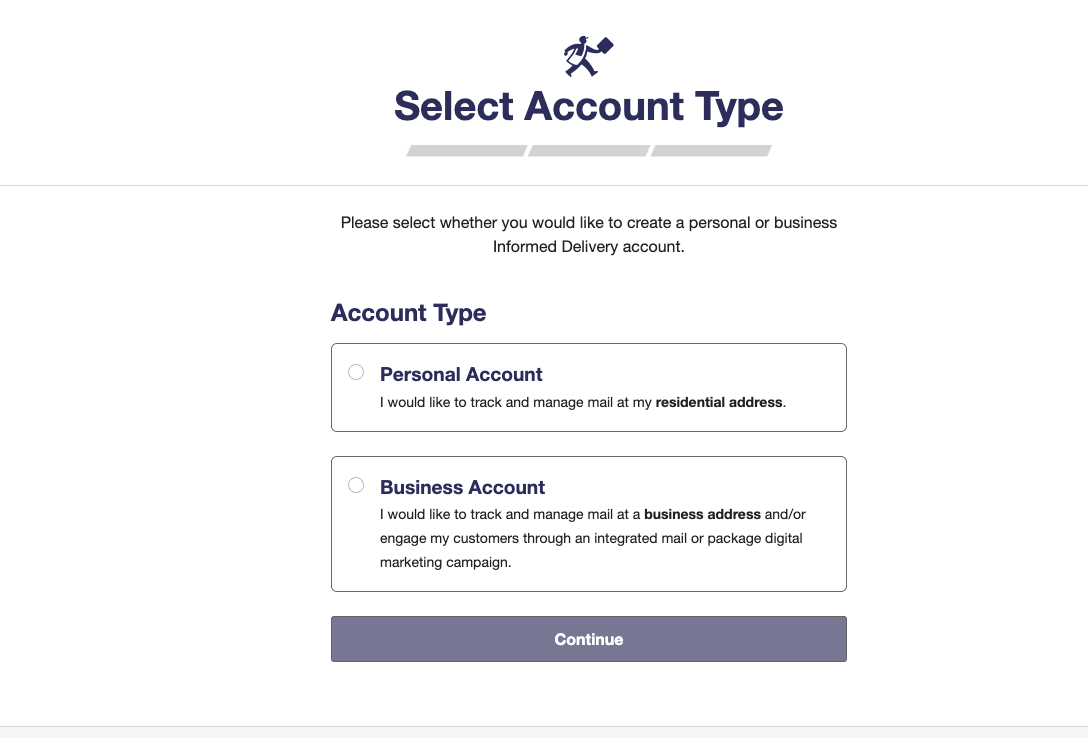
1. Go to informeddelivery.usps.com and pick Business Account
Same starting place as the Personal flow. Click "Sign Up For Free." USPS asks for an email address, then presents an account-type picker:
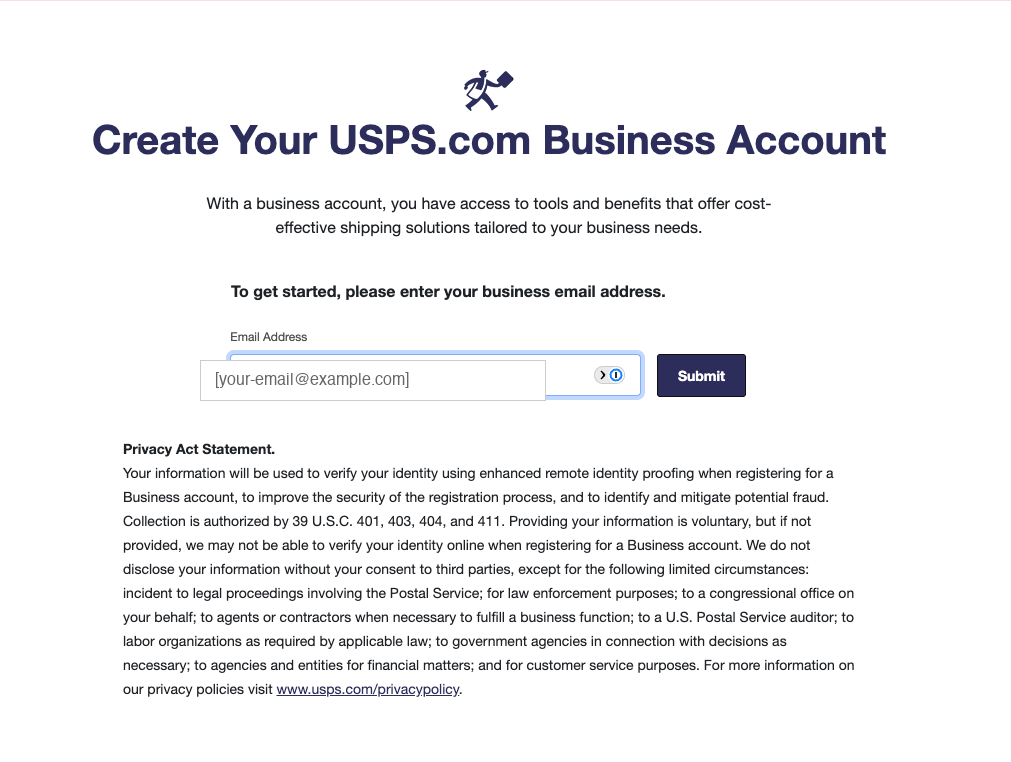
2. Enter your business email
USPS sends a validation email. Click the link. You land on the business account creation form.
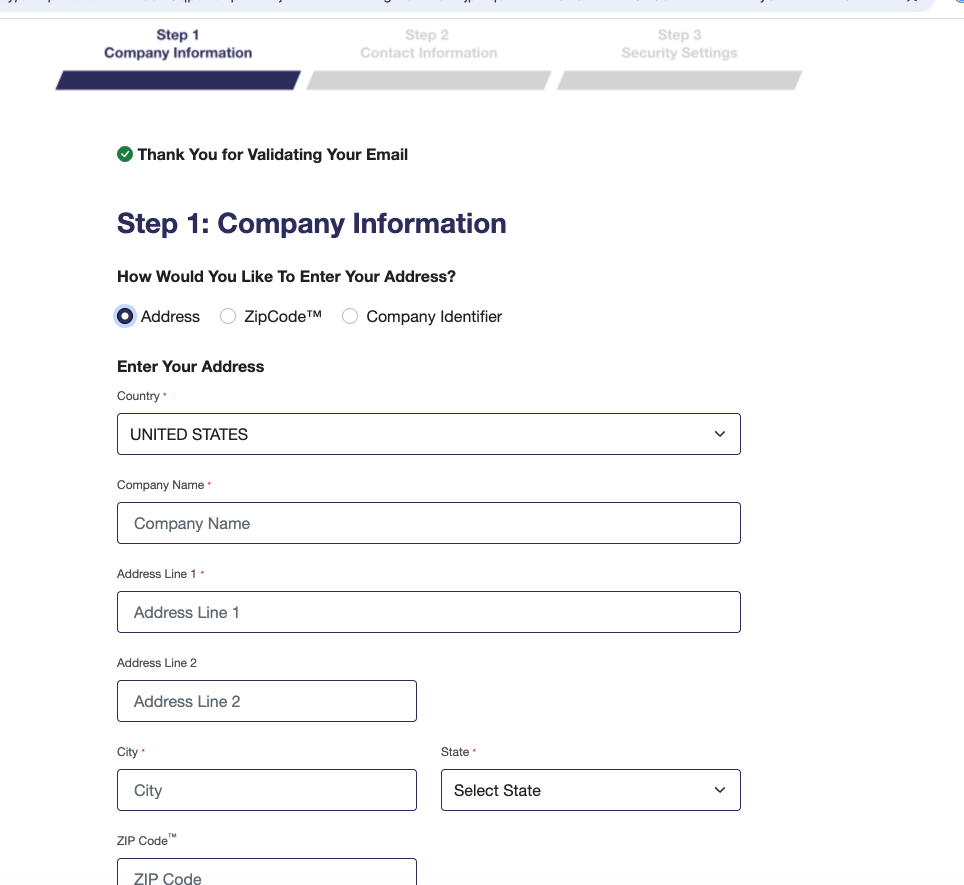
3. Step 1 — Company Information
Enter your business name, full mailing address, city, state, and ZIP. Virtual mailbox users: put the PMB number on Address Line 2.
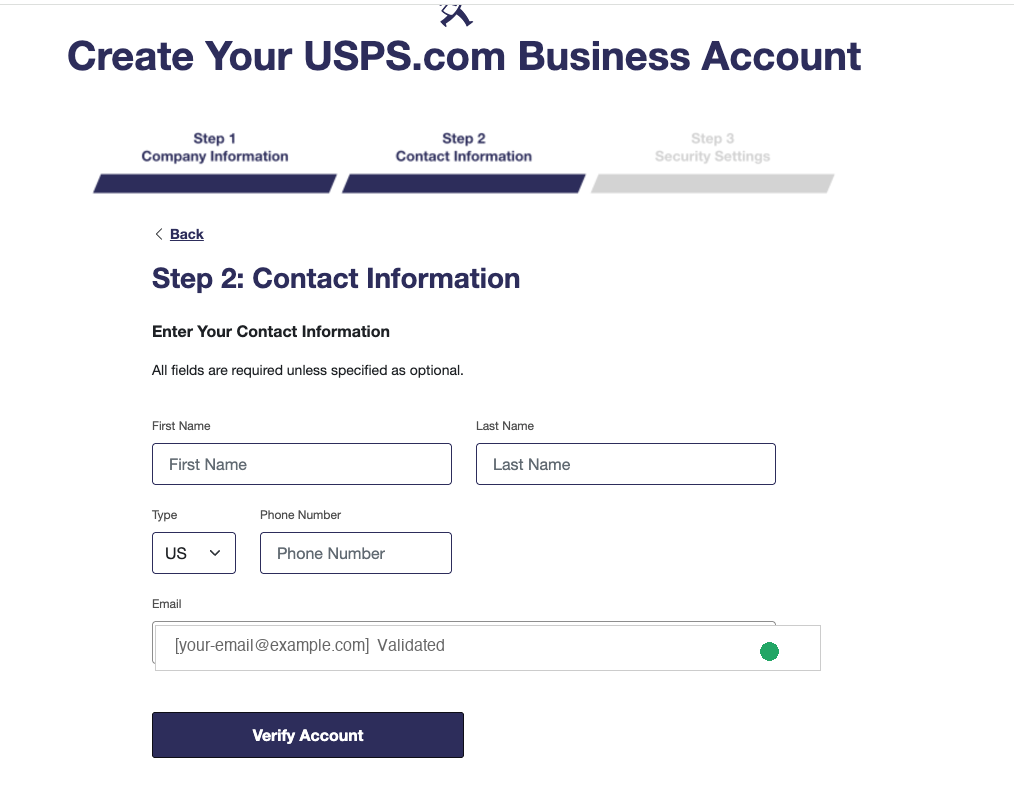
4. Step 2 — Contact Information
First and last name, phone number, and the validated email from earlier. Click Verify Account.
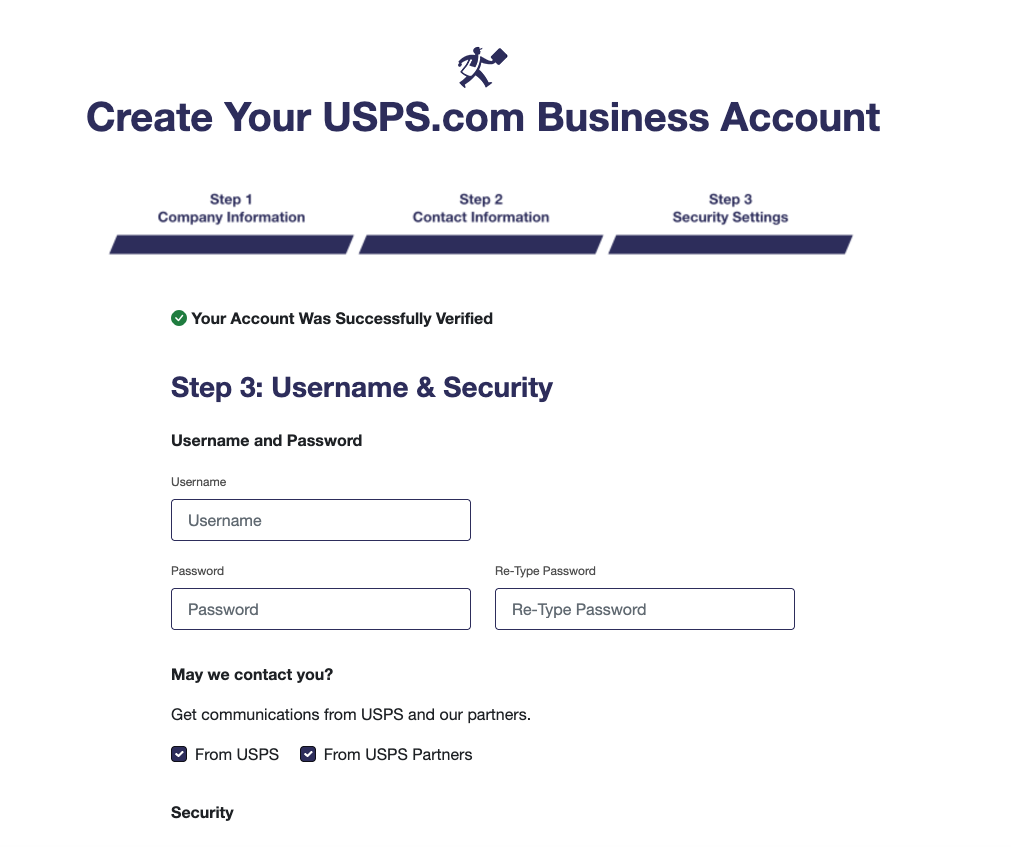
5. Step 3 — Username and Security
Pick a username and password, answer the security questions, and set your communication preferences. Submit.
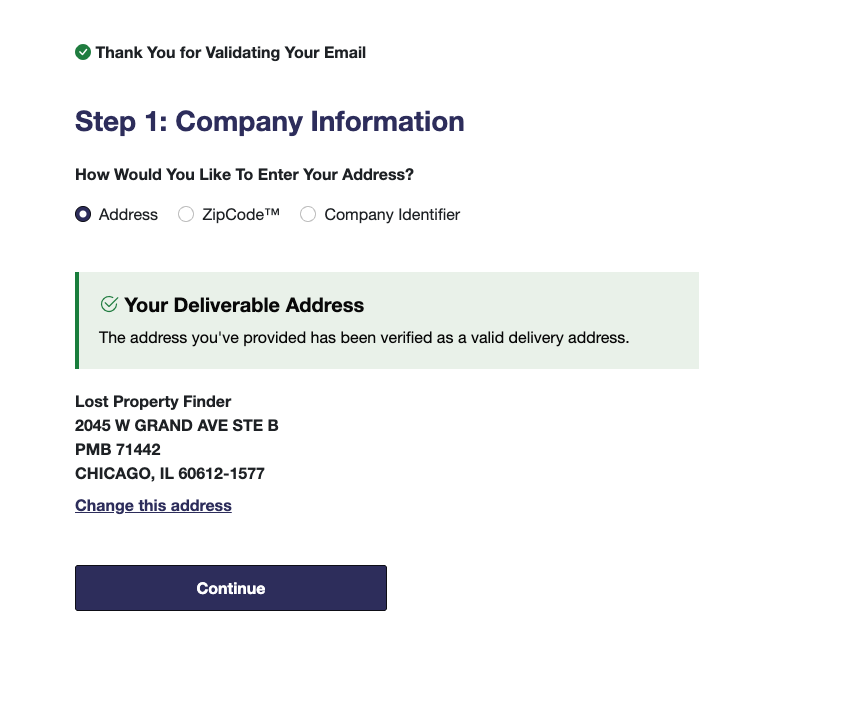
6. Confirm the Informed Delivery address
After you create the account, USPS validates the specific mailing address you want Informed Delivery for. A CMRA address passes this check:
7. For CMRAs — the rejection
Click Continue. For CMRA addresses specifically, this is where USPS stops the flow:
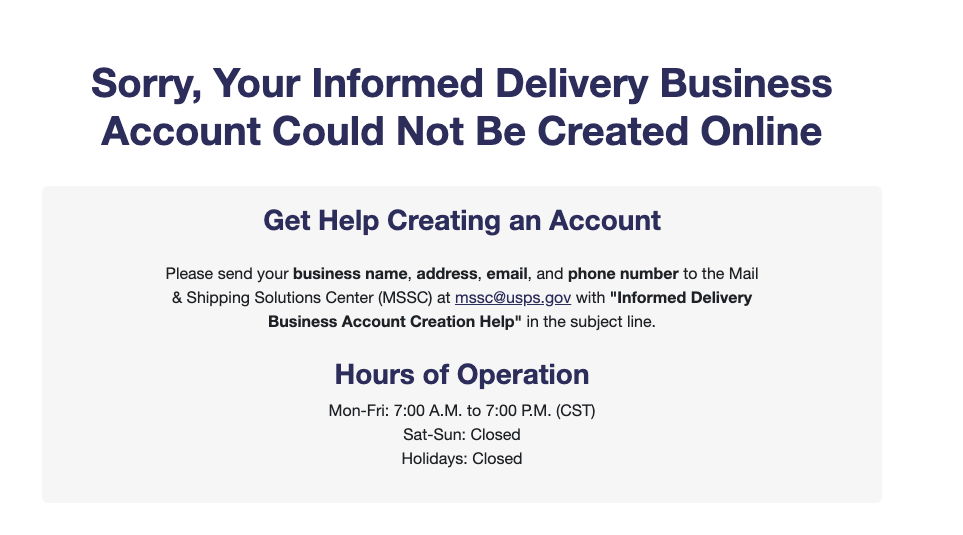
USPS redirects you to email the Mail & Shipping Solutions Center (MSSC) at mssc@usps.gov (M-F, 7 AM to 7 PM CST) with your business name, address, email, and phone. Subject line: "Informed Delivery Business Account Creation Help."
We'd love to tell you the MSSC email works and a human creates the account in a few days. We can't — we haven't found anyone who's made that path work. If you try and it succeeds, tell us so we can update this guide.
The practical path for CMRA tenants
If you're a tenant at EarthClass Mail, iPostal1, Anytime Mailbox, Alliance Virtual Offices, or any other virtual mailbox provider, you already have the equivalent of Informed Delivery. Your provider scans every piece of mail that arrives at your box and emails you a daily digest. That digest gives you the same useful information — who's mailing you, what it looks like — without USPS involved.
You can forward that digest to PostalDetox the same way residential users forward the USPS version, and we'll identify the junk and file opt-outs on your behalf. How PostalDetox works.
Common problems and fixes
"My address isn't eligible."
USPS decides eligibility based on how your mailbox is coded in their system. Apartments and condos sometimes share a code with the whole building, which means Informed Delivery can't tell which scan belongs to which unit. If this is you, join the waiting list USPS offers. There's no way around it from the outside.
"The identity check failed online."
TransUnion couldn't match you to a credit profile. This happens if your credit is frozen, if you have a thin credit file, or if the questions were wrong. Ask USPS to mail you a verification code instead — it shows up in a week or so and works fine.
"I signed up but I'm not getting daily emails."
Give it 3 business days. USPS sometimes takes a day or two to start the feed. If you still don't see anything, check your spam folder — the first few can land there. Also check that you clicked the confirmation link in the USPS signup email. If you skipped that step, the account isn't active yet.
"I see some scans but not all my mail."
Informed Delivery shows letter-sized mail that goes through USPS's automated sorting equipment. Large envelopes, magazines, and packages don't always show up. That's expected — USPS only scans what the machines can scan.
"I got an email but no photos."
This happens when USPS has mail for you that day but none of it was letter-sized. You'll see a short note saying "no images available today." That's normal. The daily email still counts.
Next: stop the junk mail you're about to see
Once the daily previews start, you'll notice something — most of it is junk. Catalogs, credit card offers, Valpak coupons, insurance solicitations, catalogs you never asked for. That's where PostalDetox comes in.
Forward those daily USPS emails to us. We read every piece, flag what's important, and show you which junk mailers you can stop. One click and we handle the opt-out for you — email, web form, or a physical letter through the mail. Free to see your report and do email opt-outs. We charge $2 for physical letters, just enough to cover the stamp.
Nobody else reads your Informed Delivery for you. We built it because we got tired of standing over the recycling bin every day.
Sign up for PostalDetox freeSee also
- How to create email filters in Gmail — once you have Informed Delivery, set up auto-forwarding to PostalDetox
- How PostalDetox works — the 3-step overview